



Shared staging environments work until several teams need them at once. One feature changes a database schema. Another modifies an API. QA needs stability for regression testing while developers wait to validate new code. Staging quickly becomes a queue.
Ephemeral environments solve this by creating an isolated preview environment for a branch or pull request, validating the change in production-like conditions, and removing the infrastructure when work is complete.
For cloud-native teams, this connects Git, CI/CD, Infrastructure as Code, Kubernetes, observability, and cost control into one automated lifecycle.
Ephemeral environments are temporary application and infrastructure environments created for a specific development or testing task.
Unlike development, staging, or production environments that remain available continuously, an ephemeral environment has a defined lifecycle. CI/CD automation creates it when required and removes it after a pull request is merged, closed, or expires.
Preview environment, PR environment, review app, temporary test environment, and environment per pull request are common variations of the same pattern.
Typical workflow starts with a Git branch and pull request, followed by CI/CD execution and infrastructure provisioning. Once the preview environment is ready, teams can test the change. After the pull request is merged or closed, the environment is automatically removed.
Core value is isolation. Teams can validate changes in parallel instead of competing for one shared environment.
Shared staging often works well at first. Problems appear as delivery frequency and team count grow.
Changes compete for deployment, database state shifts between tests, broken features block others, and QA may not know which commit is currently deployed.
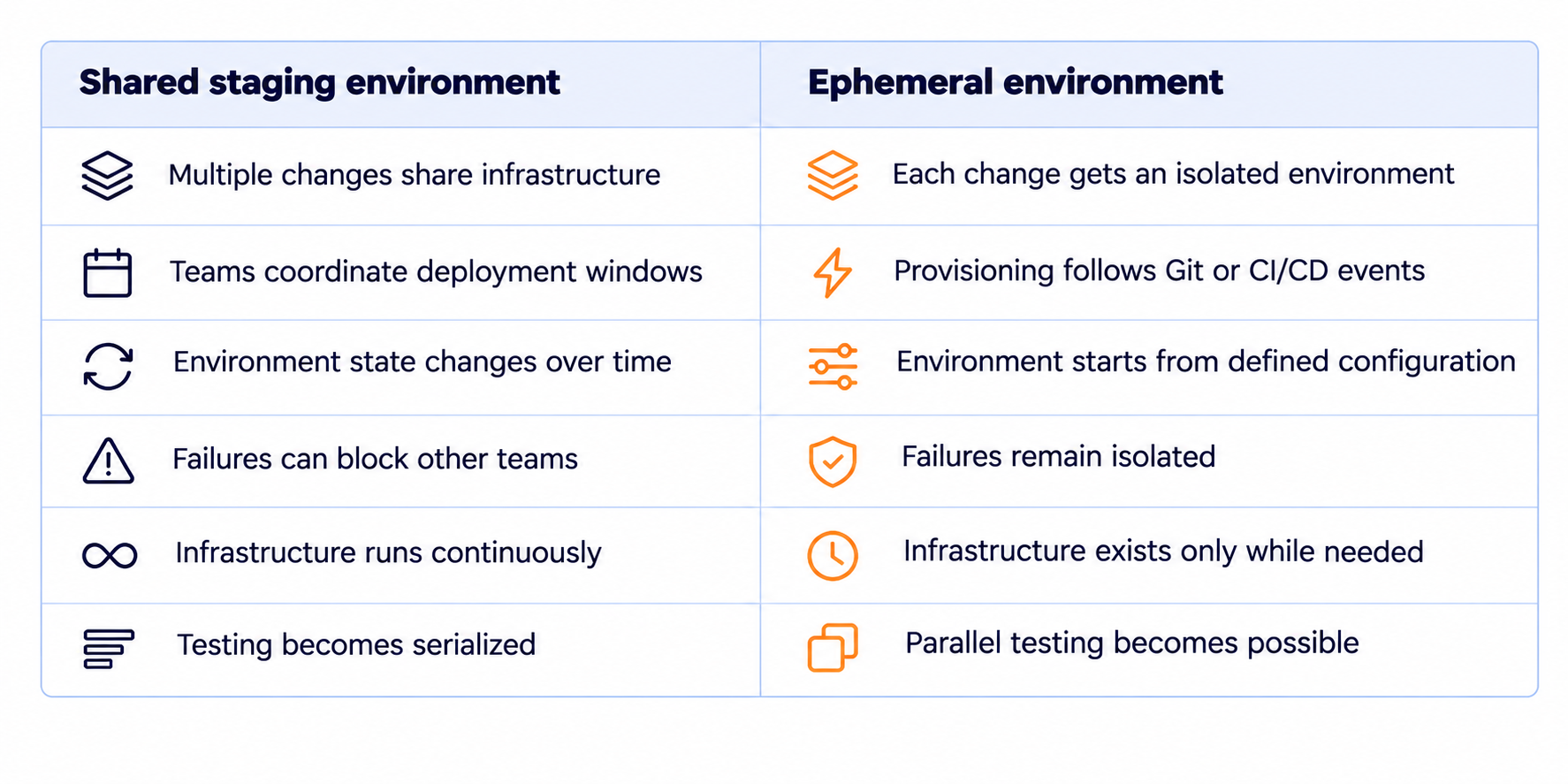
Staging can still support integration, performance, release, or acceptance testing. Better question is whether every pull request should depend on it.
Automated preview environments turn environment creation into part of the delivery pipeline.
Pull request creation triggers the workflow. Pipeline builds the application, executes checks, provisions infrastructure, deploys the candidate version, and exposes an endpoint for testing. Merge or closure triggers cleanup.
Four components usually define the lifecycle:
This complements GitOps practices for cloud infrastructure, but goals differ. GitOps continuously manages desired state. Ephemeral environments create temporary isolated states for specific changes.
Real applications depend on databases, queues, caches, secrets, DNS, identity providers, storage, observability, and external APIs.
Architecture must define what gets duplicated, what remains shared, and what can be mocked.
Application workloads usually need dedicated deployment. Databases may require an isolated schema, snapshot, or temporary instance. Queues, caches, and storage paths need unique identifiers.
Production data needs stricter treatment. Sanitized snapshots, generated fixtures, or controlled test datasets are usually safer than copying real customer data into ephemeral test environments.
Every preview environment should have a unique identifier based on a pull request number, commit SHA, branch slug, or generated ID.
Use it consistently across:
Predictable identity simplifies provisioning, debugging, cost allocation, and cleanup.
Manual provisioning defeats the purpose of ephemeral infrastructure. Infrastructure as Code should make environment creation repeatable across branches and teams. Terraform, OpenTofu, CloudFormation, Helm, or similar tooling can define cloud resources and runtime configuration.
Production does not need to be duplicated byte for byte. Ephemeral environments should preserve the interfaces and behavior needed for validation while using smaller or cheaper infrastructure where safe.
OpsWorks includes Infrastructure as Code and CI/CD implementation within broader DevOps Transformation. Preview environment automation works best when infrastructure definitions and delivery pipelines evolve together.
Kubernetes is well suited to ephemeral environments because workloads can often be isolated without creating a full cluster per pull request.
Common model uses one namespace per preview environment containing:
Namespace isolation is not enough in every case. Shared ingress, operators, persistent storage, secrets, external databases, and cluster-level resources can cross boundaries.
Dedicated clusters may be justified for highly sensitive workloads or tests that modify cluster-level infrastructure. Cost and provisioning time increase substantially, so they should remain an exception.
Teams using EKS can also build preview workflows on top of reusable foundations such as OpsWorks AWS EKS Infrastructure.
Database strategy is usually the hardest part of environment per pull request architecture.
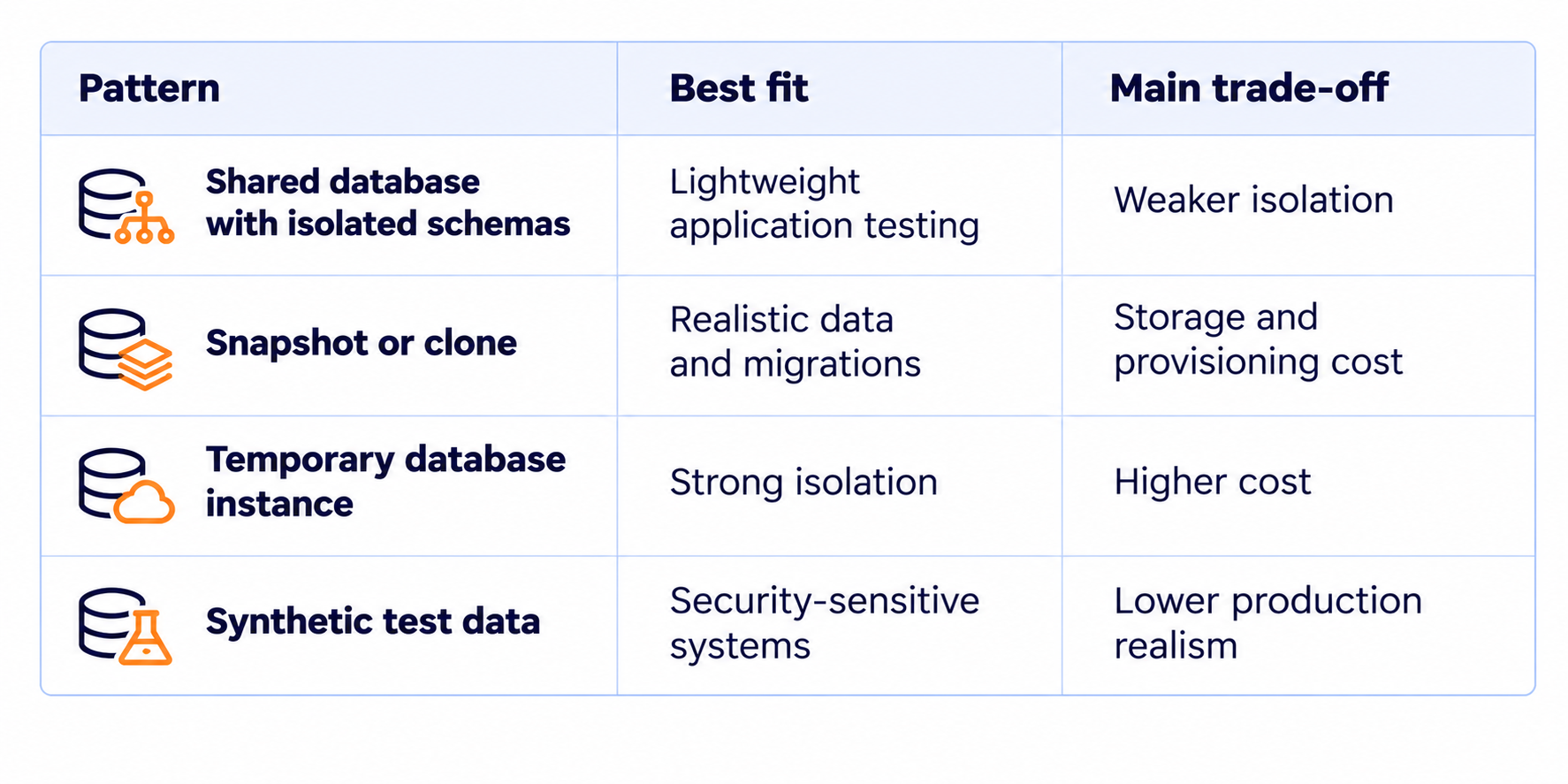
Decision should consider schema migration risk, data size, provisioning speed, compliance requirements, and cost.
Temporary infrastructure still needs visibility. Logs, metrics, traces, deployment metadata, and CI/CD events should carry the environment identifier. Developers should be able to move from a failed preview directly to the relevant deployment and telemetry.
Full monitoring stack does not need to be duplicated for every environment. Centralized observability with environment-level labels is usually more efficient.
Principles from a broader cloud observability strategy apply here as well.
Ephemeral environments can reduce idle infrastructure because resources disappear after use. Poor lifecycle management can produce the opposite result.
Pull requests stay open. Database clones accumulate. Kubernetes workloads reserve capacity. Forgotten environments become another source of cloud waste.
Useful controls include:
Cleanup must cover more than compute. DNS records, load balancers, persistent volumes, snapshots, identities, secrets, queues, and object storage can remain after the main workload disappears.
Practices from cloud cost optimization apply directly: lifecycle automation, rightsizing, tagging, and removal of idle resources should include development infrastructure.
Preview environments expand infrastructure surface area.
Temporary endpoints may expose code that has not passed production validation. Test databases may contain sensitive information. Shared credentials can provide access to permanent systems.
Security controls should therefore follow the lifecycle. Use scoped secrets, restrict access to internal previews, avoid production credentials where possible, and validate code and infrastructure before deployment.
OpsWorks' guide to DevSecOps implementation in CI/CD pipelines covers security checks for code, dependencies, secrets, containers, and Infrastructure as Code.
Not every organization needs an environment per pull request.
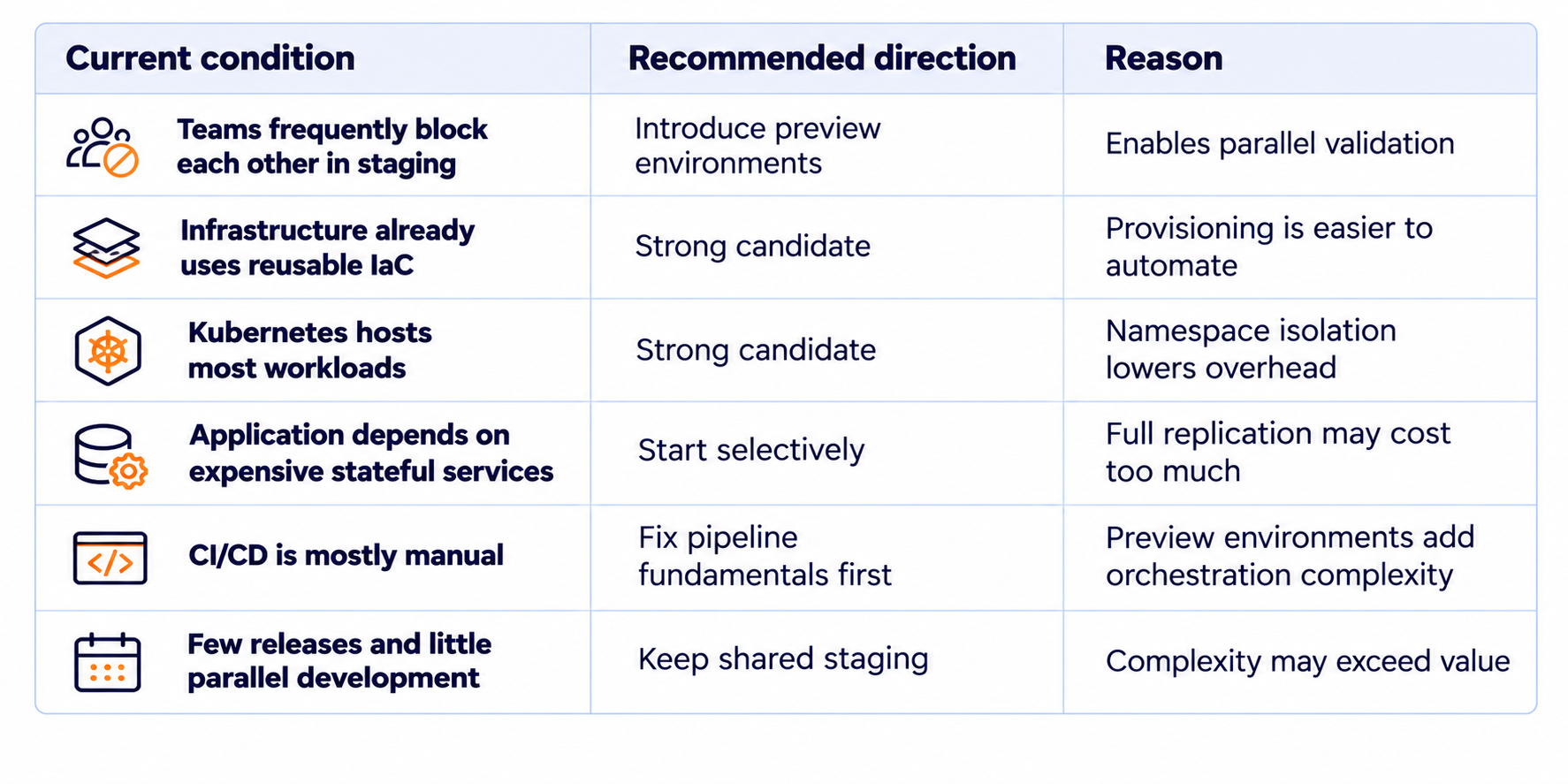
Start where friction is measurable. One service or one high-contention workflow is often enough to validate the model.
Preview environments become complicated when every team creates its own approach to databases, secrets, DNS, policies, and deployment logic. Reusable templates and self-service workflows reduce this fragmentation.
This is where preview environments intersect with internal developer platforms. IDP can expose “Create preview environment” as a standard capability while hiding Terraform modules, Kubernetes configuration, and CI/CD orchestration behind a supported workflow.
Ephemeral environments are not primarily a tooling problem.
Challenge lies in connecting delivery workflows, infrastructure, dependencies, security, observability, and cost into a predictable lifecycle.
OpsWorks approaches this as part of DevOps Transformation, combining CI/CD implementation, Infrastructure as Code, cloud infrastructure, Kubernetes, and monitoring.
Typical assessment starts with a few questions:
Answers determine whether a team needs Kubernetes namespaces, temporary databases, IaC modules, GitOps workflows, or a combination.
Goal is not to create one environment per pull request at any cost. Goal is to let teams validate changes independently, receive feedback earlier, and remove temporary infrastructure automatically without creating unnecessary operational overhead.
Ephemeral environment is a temporary application or infrastructure environment created for a specific task such as testing a branch or pull request. It is provisioned automatically and removed when work is complete.
Preview environment is an isolated deployment used to review and test changes before they reach shared staging or production. Preview environments are commonly linked to pull requests or branches.
Ephemeral environments are temporary and usually dedicated to one change. Shared staging is long-lived and receives changes from multiple teams or developers.
CI/CD reacts to a branch or pull request event, builds the application, provisions required infrastructure, deploys the change, runs tests, publishes a preview endpoint, and removes the environment after merge or closure.
Yes. Kubernetes preview environments often use separate namespaces for each pull request. More complex workloads may also require dedicated databases, storage, networking, or clusters.
Not necessarily. Preview environments work well for isolated feature validation, while staging remains useful for integrated release testing, performance testing, or final acceptance.
Cost depends on architecture and environment lifetime. Automatic teardown, TTL policies, rightsizing, and resource limits are essential, especially when many environments exist in parallel.
They provide the most value when teams develop in parallel, shared staging creates waiting time, CI/CD is mature, infrastructure can be provisioned automatically, and dependencies can be isolated reliably.


Subscribe to our newsletter and get the latest insights that help you stay ahead of the curve.

© 2017-2025 All rights are reserved


